Professionals collaborating around a table in a modern office
Connected for what comes next

Enterprise Connectivity Solutions for Growing Organizations

Modern organizations require connectivity infrastructure that can support complex operations, distributed teams, cloud applications, and multiple business locations. ZTN focuses on understanding enterprise connectivity requirements and exploring suitable networking solutions for evolving business environments.

People / places / applications
The bigger picture

What are enterprise connectivity solutions?

Enterprise connectivity is the collection of access connections, internal networks, inter-site links, equipment, policies and operational practices that let an organization’s people and systems exchange information. Internet access is one part of that picture: it connects a site to external networks. The corporate LAN, Wi-Fi, secure remote access and any connection between offices form other parts. A fast internet circuit cannot resolve a congested switch, poorly placed wireless access point or unavailable application.

Home and small-office networks often have one site, relatively few devices and a straightforward router. Larger organizations may have different departments, sensitive systems, many simultaneous users, branch offices and applications in several clouds. They need to define who can reach which resource, where traffic should travel, how faults are identified and how capacity changes as the organization grows. That requires architecture, not simply a larger advertised speed.

Connectivity supports calls, collaboration, transactions, data exchange and access to hosted applications. Its design should follow business dependencies: an interruption to a training portal differs from an interruption to a branch’s essential operating system. Requirements vary with organization size, industry, applications, locations and existing technical architecture. This page explains general networking concepts; it is not a specification of equipment, security products or managed network functions supplied by ZTN.

Start with the workMap users, applications, dependencies and busy periods before choosing an access model.
Design the whole pathConsider premises, local network, access, routing, destinations and continuity together.
What an organization may need

Enterprise connectivity requirements.

The following are assessment areas, not features automatically included in a ZTN service. Prioritize them according to the cost and consequences of an interruption at each site.

Scalable bandwidth

Capacity planning should account for concurrent employees, connected devices and changing workloads, not just total headcount. Compare present busy-hour usage in both directions with expected growth, large uploads and cloud migration. An upgrade remains subject to site feasibility and written service terms.

Network availability

Availability matters when teams depend on online systems to operate. Identify which site and application failures stop essential work, then distinguish access-circuit availability from power, local equipment, DNS and cloud-platform availability. An end-to-end continuity plan considers all of them.

Multi-location connectivity

Branches may need access to central records, shared services and one another. Each location requires an address-specific internet assessment; secure inter-site communication requires additional architecture. A group of internet connections does not by itself form a private WAN.

Cloud connectivity

SaaS and hosted infrastructure create traffic patterns that depend on where users and applications reside. Evaluate bandwidth, latency, identity dependencies, routing and fallback procedures. Cloud access can be critical even for an organization that hosts no equipment in its own office.

Secure network access

Segmentation and access policies can separate employee, guest and sensitive-system traffic. Firewalls, authentication and approved remote access need individual design and ownership. Buying internet connectivity does not automatically supply enterprise cybersecurity.

Centralized management

Distributed environments can benefit from a consistent view of sites, configurations and faults. Determine who maintains inventories, reviews changes and responds to alerts. Any particular management or monitoring platform must be verified separately rather than assumed to be part of a connection.

Business continuity

Backup access, independent physical paths, power protection and tested procedures can reduce dependence on one component. Two commercially separate links may still share a duct or building entry. Establish recovery priorities before selecting resilience measures.

Technical support planning

Document equipment ownership, fault-reporting responsibilities, escalation contacts and diagnostic information. Troubleshooting may involve the internal IT team, access provider and application owner. Review actual support scope in a proposed agreement; no response time is implied here.

Access that fits the workload

Enterprise internet connectivity.

Enterprise-grade requirements are defined by operational demand and the written service design—not by a universal bandwidth threshold.

Capacity in both directions

High-capacity access may matter where many users run business-critical applications at once. Downloads include software, web applications and cloud records; uploads include calls, backups, media and data synchronization. Symmetric bandwidth means equal specified upload and download capacity. It can be useful for substantial two-way traffic but should never be inferred from a service name alone. Estimate concurrency and allow space for busy periods rather than adding every application’s maximum as though all peaks were simultaneous.

Dedicated internet describes a defined access-capacity arrangement within an agreed scope. Fiber describes a physical access medium. A fiber service may be shared or dedicated; a dedicated service may use an appropriate available medium. Compare the offered handoff, capacity, addressing and responsibilities instead of treating these terms as interchangeable.

Performance and written terms

Network performance also depends on latency, packet loss, local Wi-Fi, router capacity, upstream paths and remote services. A static public IP might be relevant to a specific routing, firewall or remote-access design, but its availability is not automatic. Read any applicable Service Level Agreement for its measurement boundary, fault procedure, exclusions and remedies. No SLA or static IP is promised by this overview.

The suitable model varies by applications, location, budget and interruption impact. Explore Business Internet, Dedicated Internet and Fiber Internet as distinct topics, then discuss address-specific options and written specifications.

One organization, many places

Multi-branch and multi-location connectivity.

A headquarters, regional office, branch and remote worker can need different access and security arrangements even when they use the same central applications.

Head office may host shared resources or coordinate policies. Regional offices and branches need their own feasible internet access and a secure way to reach permitted systems. Remote teams may connect from individually arranged home internet, while cloud applications sit outside every office. Inter-office calls, shared records and centralized applications create different traffic paths; sending all branch traffic through headquarters is not always the right design. Assess local internet breakout, policy consistency, application location and the effect of a failed site before choosing an architecture.

Head OfficeShared services and organizational policies may be coordinated here.
Regional OfficesRegional sites need appropriate local access and approved inter-site paths.
Branch LocationsEach branch has distinct applications, equipment and feasibility.
Remote TeamsEmployees require secure access over their own available connections.
Cloud ApplicationsHosted platforms may be reached from several locations.

Conceptual relationship, not a literal traffic route or ZTN network topology. Actual designs may use different paths and technologies.

Expansion planning should include how new branches receive addressing, security policy, local access, equipment documentation and operational ownership. Traditional WAN arrangements, encrypted connections over the internet and other architectures have different properties. No private WAN or managed SD-WAN service is claimed for ZTN here.

Inside the enterprise network

Enterprise network architecture.

These are general design concepts, not an inventory of products or managed capabilities supplied by ZTN. Real networks may combine or simplify layers according to scale.

Access layerSwitches and wireless access points connect users, phones and devices.
Distribution layerAggregates access segments and applies appropriate routing or policies.
Core networkProvides a central high-capacity path between major network segments.
Security & routingRouters connect networks; firewalls enforce defined traffic boundaries.

Illustrative logical layers. Equipment placement and security controls differ by architecture.

Core and distribution

The core carries traffic among major parts of a larger environment; the distribution layer aggregates access networks and may enforce routing or segmentation policy. A smaller network may combine these functions. Capacity and fault domains should be considered before assuming every campus requires a three-tier design.

Access, switches and Wi-Fi

The access layer connects end-user devices. Switches provide wired connectivity and can separate traffic into appropriate logical segments. Wireless access points serve business Wi-Fi, but coverage, interference, client density and authentication require separate planning.

Routers and firewalls

Routers direct traffic between IP networks, including toward external destinations. Firewalls evaluate traffic against security rules and establish boundaries. A firewall is one control, not a complete security program; its placement, policies and maintenance determine its usefulness.

Network monitoring

Monitoring can reveal interface load, device health, link status and faults. Useful observations require agreed measurement points and people who can interpret alerts. An access service should not be assumed to include customer-network monitoring or a particular dashboard.

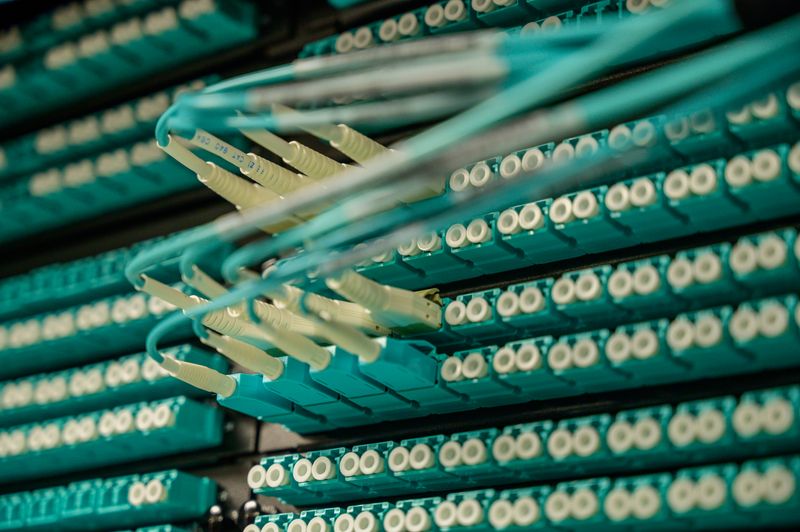
Fiber-optic cables connected to communications equipmentThe physical access layer
Optical infrastructure

Enterprise fiber connectivity.

Optical fiber carries information as pulses of light through strands of glass or similar material. In an enterprise setting, fiber can form part of the access path into an office, a building distribution system or a connection between network facilities. Its physical characteristics make it useful for substantial data transmission, but the actual bandwidth available to an organization is determined by the equipment, network design and purchased service.

Corporate offices, data-intensive operations and organizations with several sites may investigate fiber access. Every location requires its own feasibility review. Existing routes, building-entry permissions, internal pathways, optical distribution, last-mile construction and equipment space can affect installation. A nearby cable does not prove that a particular unit or floor can be connected.

Fiber is an access medium, not a promise of dedicated bandwidth, symmetric capacity or a specific Service Level Agreement. Ask what physical path and written service specification apply at the address.

Explore Fiber Internet
Network connections and equipment in a communications rackDefine the service boundary
Specified access capacity

Dedicated internet for enterprise organizations.

Dedicated internet access may be relevant when a larger organization needs a defined allocation of access capacity and clearly documented terms. Predictable access capacity can aid planning for cloud workloads, simultaneous video and voice sessions, large data transfers and enterprise applications. It does not reserve every upstream network or ensure constant performance at a distant application.

Review the contracted upload and download capacities rather than assuming symmetry. Determine whether static public addressing is needed for an approved technical design and whether it is offered. Examine any applicable SLA for its measurement scope, reporting procedure, exclusions and remedies. A primary dedicated circuit may still need a separately designed backup path to support continuity goals.

Exact service characteristics depend on the provider agreement, location and proposed network design. The term “dedicated” alone confirms neither availability nor a specific ZTN commitment.

Learn About Dedicated Internet
Where the applications live

Cloud connectivity and digital workloads.

Cloud computing changes the direction and timing of enterprise traffic. No cloud-provider partnership is implied by this educational overview.

SaaS, IaaS and PaaS

Software as a Service delivers hosted applications; Infrastructure as a Service supplies compute and related resources; Platform as a Service provides a managed environment for building applications. Each model changes which systems an organization operates directly, but none removes the need for dependable access, identity controls and recovery planning.

Daily business systems

ERP, CRM, cloud-hosted applications and shared storage can create constant small transactions alongside occasional large files. A slow login, report or record lookup may stem from application processing, DNS or latency rather than insufficient bandwidth alone. Identify which platforms are essential and where their users are located.

Backup and synchronization

Cloud backup, disaster-recovery copies and file synchronization can create sustained upstream demand. Estimate change rates and recovery objectives, schedule heavy transfers where possible, and check whether the receiving platform can accept data at the planned rate. A stored backup should also be tested for restoration.

Distributed collaboration

Video meetings, shared documents and remote desktop access depend on both directions of a connection. Interactive sessions are sensitive to latency, jitter and packet loss. Routing decisions and availability across several networks affect the experience, so measure from relevant offices and remote-user locations.

Capacity planning should consider peak concurrency, application location, upstream demand and the impact of losing access. A resilient access design cannot prevent an outage within a cloud application itself; document alternative workflows where the business requires them.

Connectivity is not cybersecurity

Enterprise network security.

Internet access provides a path for traffic, not complete protection. The following are general security architecture considerations; no ZTN security product, certification or protection guarantee is asserted.

  • Firewall architectureDefine security boundaries and review which inbound and outbound flows are necessary. Document rule ownership and changes.
  • Network segmentationSeparate sensitive systems, operational devices, employee networks and guest access where appropriate; verify permitted traffic between segments.
  • Access controlGive users and devices the access they need for their roles, then remove or revise permissions as responsibilities change.
  • VPN and remote accessEncrypted tunnels can protect traffic over untrusted networks. Secure authentication, device posture and endpoint maintenance remain important.
  • Identity and authenticationDecide how people and devices prove who they are, how accounts are managed and how administrative privileges are limited.
  • Guest isolationKeep visitor connectivity separate from internal business resources and review the wireless configuration that enforces that separation.
  • Monitoring and logsCollect appropriate network and security signals, assign review responsibilities and respect applicable privacy requirements.
  • Router configurationRestrict management access, remove default settings that are not appropriate and keep an approved configuration record.
  • Firmware maintenancePlan updates for routers, firewalls, switches and access points, including testing and rollback where needed.
  • DDoS conceptsDistributed attack traffic can overwhelm a service or application. Assess exposure and ask separately about any available mitigation scope.
  • Incident responseDocument who investigates, contains, communicates and restores service when a security event occurs.
  • Security policyKeep standards for access, change control, backups and reviews current as locations and applications evolve.
A connection may carry secure traffic, but encryption, firewall policy, identity management and incident response are separate design and operational responsibilities. Verify the actual scope of any proposed service in writing.
A networking concept, not an offering claim

SD-WAN and modern enterprise networking.

A wide area network, or WAN, connects networks across geographically separated sites. Traditional WAN designs may use private connectivity and site-specific routing. The public internet supplies general reachability, but an internet connection alone is not a managed inter-site WAN. Software-Defined WAN (SD-WAN) describes an approach that uses software-controlled policies to manage traffic across available WAN links.

Depending on its design, an SD-WAN environment can apply centralized policy, select links based on application or path conditions, prioritize traffic and provide visibility across branches. Multi-link arrangements might combine different underlay connections, but policy quality, security architecture, equipment compatibility and physical path independence still matter. Centralized control does not eliminate local outages or make every cloud service available.

These are provider-neutral educational concepts. This page does not state that ZTN sells, operates or manages an SD-WAN platform. An organization considering one should distinguish the underlying internet service, any private WAN connection, the overlay technology, and the party responsible for each.

Technical professional working beside communications equipmentUnderstand the layers ↗
Plan for interruption

Network redundancy and business continuity.

Resilience is a property of a tested system, not a label attached to one circuit. No automatic failover or guaranteed availability is claimed for ZTN services.

Primary and secondary access

A secondary connection may provide an alternative if the primary connection fails. Examine whether it uses a different access medium, provider infrastructure, building entry or physical route. Two links sharing a duct or aggregation point can fail together. Independence must be investigated rather than assumed from separate invoices.

Failover and equipment

A suitably configured dual-WAN router may detect a failure and direct new traffic over another link. Existing sessions can still disconnect, and public IP changes may affect VPNs or allowlisted applications. Redundant routers, switches and backup power address other single points of failure, but only if their configuration is maintained and tested.

Detection and response

Monitoring can identify a failed interface, rising packet loss or an unreachable application. Fault detection should lead to a documented response: who checks local power, who contacts the access provider, and who informs staff? Test the entire escalation path rather than relying on an alert alone.

Recovery priorities

Disaster recovery planning starts with which processes must continue, the acceptable interruption and the data required to resume work. Alternative sites, offline procedures and application recovery may matter as much as backup internet. Revisit the plan after network or organizational changes.

Different environments, different priorities

Enterprise connectivity across industries.

These are illustrative requirements, not ZTN customer stories, references or statements of sector-specific service availability.

Banking and financial services

Digital platforms and branch operations may need dependable access to centralized systems. Map transaction dependencies, secure access boundaries and what happens if one branch loses its connection.

Healthcare organizations

Digital administration, communication and cloud-based systems can depend on timely connectivity. Separate network planning from clinical safety, privacy and specialist compliance responsibilities.

Education and training

Campus Wi-Fi, online learning and shared digital resources can create sharp peaks in device density and traffic. Distributed locations may need consistent access policy and independent site assessments.

Retail and e-commerce

POS terminals, inventory tools, order administration and branch communication may share local access. Identify critical transactions and ensure guest Wi-Fi does not interfere with internal systems.

Manufacturing and industry

Business applications, monitoring systems and operational data can have different traffic and security needs. Segment operational equipment appropriately and assess interruption impact with the relevant specialists.

Logistics and distribution

Warehouses and offices may coordinate through tracking platforms and cloud systems. Consider coverage within facilities, multiple sites and the effect of delayed updates on day-to-day coordination.

IT and software companies

Cloud development environments, repositories and large build artifacts can combine latency-sensitive collaboration with heavy transfers. Review secure remote access and upstream capacity.

Corporate and professional services

Central applications, calls, shared files and distributed staff depend on predictable access. Map busy periods and determine which functions require a continuity plan.

Colleagues collaborating in a contemporary workplaceAccess beyond the office
Distributed work

Connectivity for remote and hybrid teams.

Remote employees may use video meetings, cloud collaboration, shared files, remote desktops and centralized business applications from many locations. Their experience depends on both the organization’s systems and their individual home internet connections. Improving office bandwidth will not, by itself, fix poor home Wi-Fi or a remote provider outage.

Secure VPN access or another approved remote-access design may be needed for internal resources. Identity checks, device security and least-privilege policies should accompany that design. Understand whether a session goes directly to a cloud platform, through a branch, or through a central office: each path has different capacity and latency implications.

For branch-to-home workflows, document upstream demand at the site hosting the resource as well as downstream demand at home. Measure calls and remote desktop experience at representative locations, and provide staff with clear fault-reporting guidance that distinguishes office-network incidents from individual home connections.

Measure before changing

Network performance and monitoring.

Measurements are most useful when tied to a site, time, application and network path. These are general concepts, not a claim that ZTN supplies a monitoring platform.

Bandwidth, throughput and utilization

Bandwidth is a specified carrying capacity; throughput is the useful transfer rate achieved. Interface utilization compares traffic with a link’s capacity. Sustained high use can create queues and congestion, but a low average can conceal brief peaks. Review both upload and download and distinguish a local interface from the internet handoff.

Latency, jitter and loss

Latency measures delay, often as a round trip. Jitter is variation in that delay; packet loss means expected packets do not arrive. Voice, video and interactive desktops can suffer even when bandwidth remains available. Compare wired and wireless tests and more than one destination before locating a fault.

Availability and routing

An availability metric needs a defined endpoint and observation period. Routing performance affects which paths traffic takes and whether they remain reachable. A reachable access circuit does not prove a remote application is healthy. Track traffic patterns across sites to understand where load or failure occurs.

Operational visibility

Dashboards can display device health, interface load and service reachability; alerts can flag abnormal conditions. Traffic analysis, fault reporting and capacity trends help teams decide when to investigate or plan an upgrade. Agree who owns each device, monitors each signal and acts on a notification.

Make room for change

Enterprise network scalability.

Consider future requirements before choosing a service or building a topology, while confirming that any proposed change is technically feasible.

Growth changes traffic

More employees and devices increase concurrency, but cloud adoption or one new data-intensive application can alter traffic more than headcount. New branches create additional access, policy, addressing and support requirements. Measure current peak demand and describe plausible future scenarios, rather than relying on a single growth percentage without application context.

Bandwidth upgrades depend on the physical medium, equipment, available capacity and agreement. Ask how a proposed design could be changed and which elements would require replacement. Do not treat a provider’s marketing description of scalability as an automatic upgrade commitment.

Growth changes architecture

Flexible switching, sensible segmentation, documented addressing and clear ownership can make additions easier to manage. Review whether core and distribution paths remain suitable as sites and users increase. Plan equipment space, power and building pathways for likely expansion where practical.

Capacity planning is a recurring activity. Recheck utilization, latency, application performance and business priorities after each significant move, cloud migration or change in work patterns. A scalable enterprise network is one whose constraints are understood before they become an operational emergency.

General planning framework

How to plan an enterprise connectivity project.

This ten-step framework is general educational guidance, not a guaranteed ZTN implementation process, timeline or service commitment.

01

Understand business objectives

Identify operational goals, critical workflows, stakeholders and the consequences of an interruption. Distinguish essential requirements from preferences.

02

Map existing infrastructure

Inventory offices, branches, access services, routers, switching, wireless equipment and the parties responsible for each component.

03

Identify applications

Record cloud platforms, business software, calls, collaboration tools, data transfers and where users and application endpoints reside.

04

Evaluate network capacity

Measure or estimate busy-hour concurrency, upload and download usage, latency-sensitive tasks and reasonable future demand.

05

Assess locations

Review each exact premises address, building entry, internal pathways and available access technologies. Feasibility can differ by floor or unit.

06

Review security needs

Define access control, segmentation, firewall boundaries, remote access and the operational owner of security changes.

07

Plan resilience

Identify acceptable interruption, backup routes, equipment and power needs. Investigate shared physical dependencies and test procedures.

08

Review connectivity options

Compare feasible fiber, business broadband, dedicated internet and other relevant technologies against written specifications and requirements.

09

Develop an implementation plan

Define technical tasks, permissions, responsibilities, change windows, communication and rollback considerations before work begins.

10

Test and review

Check the deployed environment against agreed requirements, document results and revisit performance as applications and sites change.

A discussion of these steps does not establish that a connection is available, that a specific technology can be installed or that ZTN performs every activity described.
The path beneath the service

Enterprise connectivity and network infrastructure.

Physical infrastructure determines which access options can be proposed at a particular building. This diagram is conceptual and does not depict ZTN’s network.

Premises equipmentCustomer router, handoff and transmission equipment connect the local network.
Building entryCable pathways, permissions and optical distribution affect installation.
Last-mile accessFiber or another feasible medium reaches the access network.
AggregationAccess traffic is collected and passed toward wider network facilities.
Core routingRouting infrastructure connects onward networks and destinations.

Simplified physical and logical path; actual equipment, ownership and route vary by service.

Fiber-optic cables and optical distribution are only parts of the access environment. Aggregation equipment, core routing, building-entry infrastructure and customer premises equipment also influence design and troubleshooting. Last-mile connectivity is especially address-specific. Genuine physical diversity requires checking whether alternative routes share ducts, entries, transmission equipment or upstream facilities.

Begin with the requirements

Why discuss enterprise connectivity with ZTN?

A productive conversation considers the organization’s applications, locations and infrastructure before assuming a particular service is suitable.

Discover Why Choose ZTN

About ZTN

01

Clarify organizational needs

Describe the people, sites and digital workflows that depend on connectivity, including what makes each interruption consequential.

02

Discuss technical requirements

Bring bandwidth directions, applications, addressing questions, existing equipment and network responsibilities into the conversation.

03

Consider physical feasibility

Location, building access and available infrastructure must be reviewed before treating an option as available.

04

Plan for change

Explain anticipated branches, new applications and capacity needs so a proposed arrangement can be evaluated in context.

05

Ask for clear scope

Verify actual service specifications, responsibilities and applicable written terms instead of inferring them from general educational information.

Organize the response

Enterprise technical support considerations.

Complex environments need a practical way to investigate connectivity faults. Record the affected site, device, application, start time and whether a wired connection behaves differently from Wi-Fi. Connectivity diagnostics can then distinguish local equipment issues, an access fault, a routing problem or an unavailable destination. Performance investigations benefit from measurements taken during the actual problem, not only after it disappears.

Keep an equipment inventory, network diagrams, configuration records and fault-reporting responsibilities current. Schedule infrastructure maintenance and plan network changes with testing and rollback in mind. Confirm who checks customer equipment, who opens provider faults and what any actual support agreement covers. No ZTN support hours or response-time guarantee is stated here.

Visit Technical Support
Enterprise solutions FAQs

Answers to common questions.

These answers describe general networking principles. Check address-specific availability and written terms for any proposed ZTN service.

Explore all FAQs
What are enterprise connectivity solutions?

They are the combination of internet access, local networking, inter-site connectivity, secure access and operational planning that enables an organization’s people and systems to communicate. The appropriate combination depends on locations, applications, security requirements and interruption impact. The term does not describe one standardized package.

How is enterprise internet different from business internet?

“Enterprise” usually describes the scale or complexity of an organization’s requirements, not a universal technical category. An enterprise may need several site connections, documented capacity, addressing and continuity planning. Compare the actual business or dedicated internet proposal rather than assuming either label guarantees a feature.

What is enterprise networking?

It is the design and operation of networks connecting organizational devices, locations, users and applications. It may include switching, routing, wireless access, segmentation, security boundaries and monitoring. Internet access is one component; internal architecture and responsibility for maintenance matter too.

Why do large organizations need scalable connectivity?

Growth can add employees, devices, branches and cloud workloads with different traffic patterns. Planning ahead helps identify equipment or access-path constraints before they disrupt operations. Scalability is not an automatic promise of unlimited bandwidth: physical feasibility and agreement terms still govern upgrades.

What is multi-location connectivity?

It describes how separate offices, branches and remote users reach shared resources and, where appropriate, each other. Each site may have its own internet service; secure communication between sites requires an additional network design. Application location, policy and failure behavior should guide that design.

What is a WAN?

A wide area network connects networks across geographically separated areas. It can use different underlying connectivity arrangements depending on the architecture. A WAN plan addresses routing, security, performance and site responsibilities; buying internet access for multiple offices does not automatically create one managed WAN.

What is the difference between LAN and WAN?

A local area network connects devices within a limited environment such as an office or campus. A WAN connects networks across more distant locations. A branch computer may first use its LAN to reach a router, then use WAN or internet connectivity to reach a central application.

What is SD-WAN?

Software-Defined WAN is an approach to applying software-controlled policies across WAN connections. Designs may select among links, prioritize applications and provide centralized visibility. Capabilities depend on the actual platform and deployment; this explanation does not claim ZTN supplies an SD-WAN service.

What is dedicated internet access?

It generally refers to a service with a specified allocation of access capacity within a defined scope. It does not reserve every network or application on the internet. Check upload and download capacity, service boundary, addressing and contractual terms in the specific proposal.

Is fiber internet suitable for enterprise networks?

Fiber can be a useful access medium for many enterprise requirements, subject to location and building feasibility. The service carried over fiber may be shared or dedicated and may have different capacity and contractual terms. Evaluate the complete specification rather than assuming fiber alone determines performance.

What is symmetric bandwidth?

It means the specified upload and download capacities are equal. It can matter for calls, backups, publishing and serving remote users, but equal capacities are not inherent in all fiber or dedicated services. Review the written capacity in each direction.

What is a Service Level Agreement?

An SLA is a contractual document describing defined measurements, processes and potentially remedies for a service. Read its measurement boundary, reporting rules, maintenance exclusions and remedy conditions. An SLA does not guarantee that every application or network beyond that boundary will always be available.

What is enterprise network redundancy?

Redundancy provides an alternative component or path when one fails. It may involve a second connection, router or power source. Its value depends on independence: two links sharing the same physical route can be affected by the same incident.

How does automatic failover work?

A configured device can test a primary path and direct traffic to an available secondary path when its failure criteria are met. Sessions may disconnect and public addressing may change during the switch. Equipment, applications and both directions of failover should be tested before relying on the design.

What is network segmentation?

Segmentation divides a network into logical or physical areas with defined traffic rules. It can separate guests, employees and sensitive systems to limit unnecessary access. The benefits depend on correctly designed boundaries and maintained policies, not simply creating separate network names.

Why do enterprises use firewalls?

Firewalls apply rules to traffic crossing a network boundary and help restrict unauthorized flows. They need appropriate placement, configuration, updates and review. They do not replace identity security, endpoint maintenance, backups or incident response.

What is a VPN?

A virtual private network uses an encrypted tunnel between endpoints over an underlying network. It can support remote or inter-site access when configured appropriately. Authentication, device security, capacity and firewall policy remain necessary; VPN availability is not implied for every internet service.

How does cloud connectivity affect enterprise operations?

When important applications run remotely, everyday tasks depend on the path to those services. Bandwidth affects transfer capacity; latency and loss can affect responsiveness; local access and cloud-platform availability both matter. Map critical platforms and fallback procedures rather than relying on a single speed measurement.

What is network latency?

Latency is delay in communication between endpoints, commonly observed as a round-trip time. Distance, routing, queues and application processing can contribute. An interactive remote desktop may feel slow despite using little bandwidth if latency is high.

What is network monitoring?

It is the observation of network status and behavior through measurements such as interface utilization, device health, reachability and packet loss. Dashboards and alerts help when someone owns the response. Monitoring a connection alone does not show every cause of application failure.

How can an organization estimate its bandwidth needs?

Measure current busy-hour use where possible, then review concurrent calls, cloud applications, uploads, backups and expected growth. Assess upstream and downstream separately. Investigate local equipment and Wi-Fi constraints before assuming additional internet capacity is the only solution.

Can multiple offices use centralized network infrastructure?

They can, if the architecture, security and capacity are designed for it. Centralized services may simplify some management but can also create dependencies on a headquarters site or shared path. Compare central access with direct cloud access and consider what happens during a site outage.

What is the difference between internet connectivity and private WAN connectivity?

Internet connectivity provides access to interconnected public networks. A private WAN arrangement is designed for communication among specified organizational sites under its particular service terms. The two can coexist, and encrypted overlays can use internet underlays, but their security and performance properties must be assessed separately.

How can enterprise networks support remote employees?

They can provide approved access to cloud and internal applications through secure identity and remote-access policies. Office-hosted resources also require enough upstream capacity. Employees’ home connections and Wi-Fi remain separate dependencies outside the office network.

What is network scalability?

It is the ability to accommodate changing users, sites, devices and workloads through planned capacity and architecture changes. Good documentation and flexible design help, but physical access and equipment limitations can still require upgrades. Reassess after major application or organizational changes.

Why is physical route diversity important?

Separate commercial connections may share a cable route, duct, building entry or upstream facility. A single physical incident can then interrupt both. Investigating genuinely independent paths helps an organization understand whether its backup connection addresses the failure scenarios it cares about.

What should an organization consider before choosing an enterprise internet provider?

Compare address-specific feasibility, capacity in both directions, handoff and equipment ownership, addressing, fault procedures, contractual scope and the ability to meet future needs. Evaluate any proposed SLA in full. Also assess the organization’s own LAN, security and continuity responsibilities.

How can I check connectivity availability for my business location?

Begin with Coverage Areas and provide the exact building address, unit or floor, plus known access constraints when contacting ZTN. A feasibility assessment may need to consider building permissions and the last-mile route. Nearby infrastructure is not confirmation of installability.

Can enterprise connectivity requirements change as a company grows?

Yes. New branches, cloud migrations, more simultaneous calls and different security requirements can change both traffic and architecture. Revisit measurements and documented dependencies regularly; a service that fits today may need reassessment as operations change.

How can I contact ZTN about enterprise solutions?

Use Contact Us to describe locations, critical applications, existing connections, capacity concerns and future plans. A discussion can explore suitable options; an inquiry does not itself confirm availability, a particular product or contractual terms.


Start with your requirements

Build a Stronger Connectivity Foundation for Your Organization.

Enterprise networks require careful planning, suitable infrastructure, and an understanding of business-critical applications. Contact ZTN to discuss your organization's connectivity requirements and explore suitable options.